Pages

Showing posts with label Manaiakalani. Show all posts

Sunday, June 21, 2020

Being an Associate Teacher in a Digital World


Having been invited to be a Digital Associate Teacher, I was not 100% sure what to expect, given that it was going to be a completely online experience. However, I am so glad that I took up this opportunity as it made me look at my online learning site from a whole new perspective, and gave me an opportunity to talk through my site with people who were looking from the outside in.

Meeting my four student teachers was an interesting and fun experience. Using Google Meet, we were immediately faced with the usual tech difficulties - frozen screens, microphones not working, dropping connections...

However, with everyone able to problem solve, we were quickly able to get in to our meeting and introductions. After a few minutes, everyone was relaxed and I was so impressed with these four students and how they were tackling their studies in such a challenging situation. I can only imagine how hard it must be, in a one year teacher training programme to be unable to go out in to schools and interact with children face to face!

Touring my class site, discussing how my classroom works and sharing resources with them was an enjoyable experience. It did not actually feel like this was the first time meeting them, as they were so open to discussion and were able to ask a range of thought provoking questions. They were also able to see how things are in a normal classroom, as although we did not have any students present, there were certainly plenty of interruptions from other staff coming to ask questions about other matters, as well as my wonderful 8 year old who is very well equipped to interrupt online meetings!

We were able to unpack the range of abilities within my classroom, and how using online tools can support students at all levels to access their learning. We discussed the difference between using a class site as the front facing environment, while using Workspace allows me to group and collate student work, with a public view, and a private view where only I can see student work. We also discussed the use of pen and paper versus digital, and how in trying to meet all needs in the classroom, we use a range of both! We also discussed the Manaiakalani pedagogy of 'Learn, Create' Share' and why this is so important in a classroom setting. I will look forward to hopefully seeing my student teachers commenting on some of my student's blogs in the coming week.

Operating on the idea that giving students choice around their learning is more often successful than only giving them one option, I have posed a few different briefs for my students, all of which relate to the area of Literacy.

  • I have a group of learners who are still at the decoding stage of reading. They are needing to sound out or break words down in to letter/sound patterns in order to read the words in the story.
  • I have a group of students who struggle with inference when reading a text/story. While they are able to quickly find answers to ‘within the text questions’ (as long as questions are in the same order as the text), they struggle to answer “why do you think..” type questions, that encourage them to think beyond the text.
  • I have a group of students who need to expand their understanding of vocabulary in order to access and understand higher level texts. For example, when faced with unknown words outside of the essential lists, many do not have the vocabulary knowledge to unpack new words and understand what they are reading. When faced with new or unknown words, they do not use known reading strategies such as reading on to try and make meaning. 
  • I have a group of students who are still not using basic punctuation such as capital letters and fullstops consistently within their writing. As a result, their sentences run together and they lose meaning.
  • I have a group of students who love to try and use dialogue within their creative writing. However, they are not able to consistently use punctuation such as speech marks and supporting punctuation (Question marks, exclamation marks) to show different speakers within the story. 

I am very much looking forward to meeting up with my students again, and seeing what digital tools they have created, based on one of the above briefs. I have also said that I am happy to use their designs in Week 12, so that they can get some actual student feedback on their work, or see what students are able to create, based on their site.



Monday, March 23, 2020

KPMG - DAY 1

Having already made the decision not to travel to Auckland for the KPMG day, due to personal circumstances, I had sorted myself an office space at home and was ready and waiting to sign on to our google Meet.

Connecting in this way was not new for me, having used this for a number of online meetings in the past, as well as during DFI in 2019. What was new, was the reason that we all ended up having to meet in this manner - Covid19. When we met in February for our Hui, I do not think any of us would have predicted the rapid pace with which this virus took over the world, sending countries in to lockdown and instilling fear and uncertainty in to our current space.

With this in mind, and with the way in which the government had been approaching the virus, this was a good opportunity for us to put in to practice some of the potential tools we would be using if the country went in to full lockdown. Of course, when we started meeting in the morning, we were only at Level 2, school was still open and life was going on mostly as per normal. Thinking about what my project might look like in a fully digital environment was an interesting concept and I am still not 100% sure where I am going to head.

This meeting provided us with an opportunity to revisit our ideas, thinking about what impact a lockdown might have on our projects and future meetings. It was also a chance to think about what teaching and learning online might look and feel like. I appreciated the opportunity to break off and connect in a small group, meeting with Alethea to talk about our respective projects, before we broke for lunch. Matt also shared his prototype learning from home page on his class site, which gave some good food for thought about my own site and what I want to do with it.

As we returned from lunch, we were all distracted by the Prime Minister's press conference, where she announced that NZ was moving in to Level 3 for two days, followed immediately by the country moving in to Level 4 lockdown for 4 weeks minimum in order to try and halt this virus within NZ. At that moment, everything felt quite surreal. I felt absolute sadness and regret that I was not at school with my class when they received this news, as well as to give them any resources and materials I could for them to use at home for the period we were in lockdown. I knew that I would not see them face to face again, in person for the for seeable future, and for some of them, this would be an incredibly stressful situation. I also felt incredibly lucky that we are a digital school, and most of our children are well prepared for connecting online.

When we left the hui, to begin reconnecting with school, working out what we needed to do in the next two days and to try and process what was happening, I think we were all thinking of the potential of what we could do, as well as with the prospect of what might come to be.

Tuesday, March 10, 2020

Crazy 8's - IDEATE

Our final activity for the weekend - the opportunity to think about what our solution might be, with the key proviso that it has to be digital.

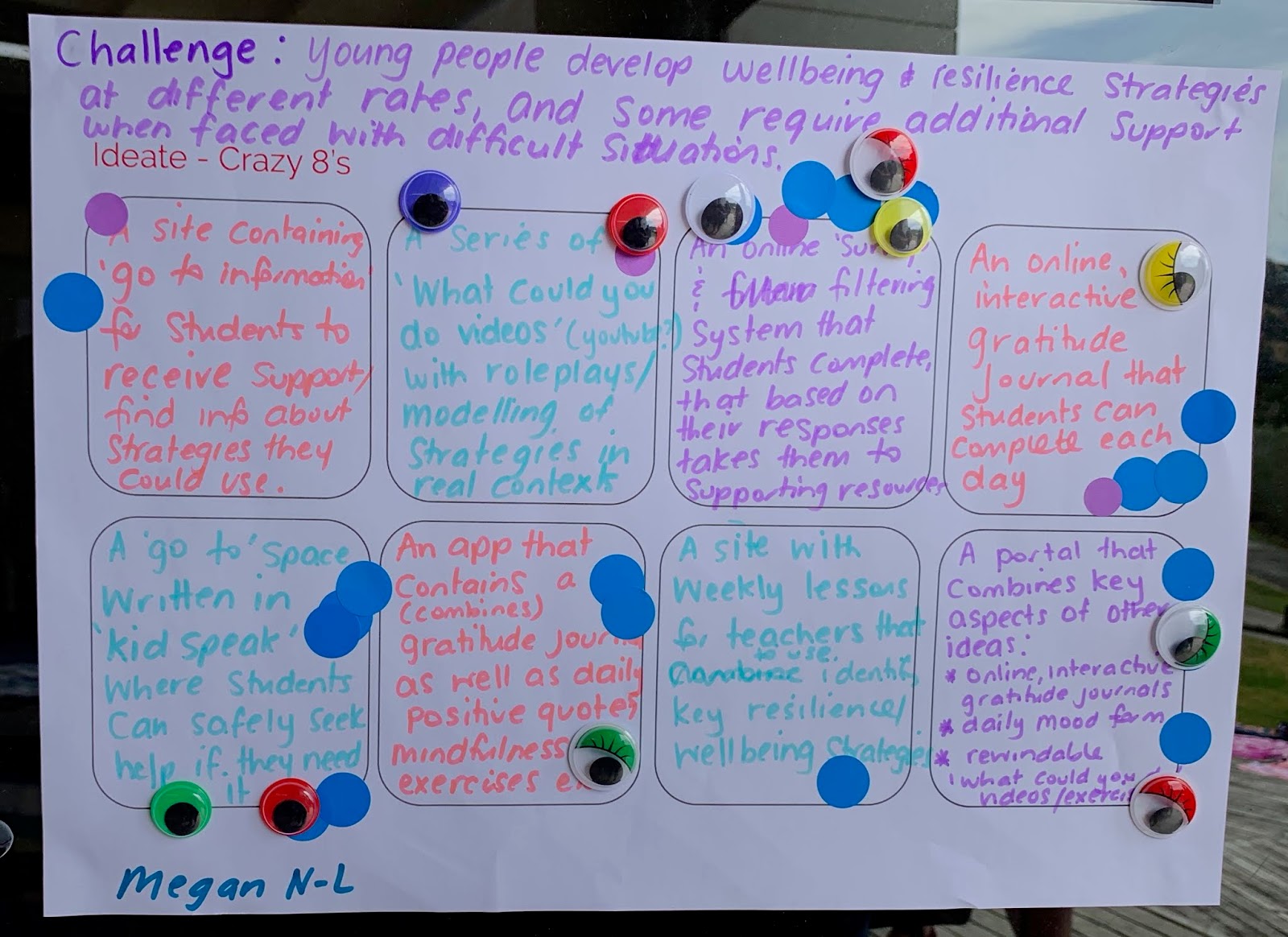
This involved us coming up with 8 ideas (Crazy 8s), with no limit on what they could be. Initially this was simple, we all had pre conceived ideas of what we though we might do coming in to the weekend, although mine had changed significantly.

My Crazy 8s

Discussing my Crazy8s with the team
We then had to go and look at the other proposals and vote on their ideas, with a final vote on the one idea we thought was the best one. While we do not have to go with what people have voted on, it is a good indicator of what might work or what other teachers see as a tool that could be valuable for them in their classrooms, with their students.

I had two ideas that came out at an even number of votes. The one that I am leaning towards is the following:

A portal that combines key aspects of my ideas, including:
Online, interactive gratitude journal
daily mood form
rewindable learning
What could you do? (videos and activities)

For me, a portal such as this would enable students and teachers to use the aspects that meet their needs, while having choice.


I would like to say a huge thank you to the amazing team. I am looking forward to continuing this journey alongside you, sharing ideas and having fun along the way! Even though I changed my original proposal, this was met with an assurance that this was ok, and that was a huge relief!

The Team - MIT 2020

Sunday, March 8, 2020

Connections & Resource people (who)


So who can we use to support us? Who are the people and where are the resources to support us as we continue on developing our solutions to our challenges?

This was a task that required us to really dig down in to who might support us on our journey. No resource or person was out of the question, as it was an opportunity to think big!


We also followed a thinking key process for this by using the BAR key - Think big, add someone, remove/replace.

This activity encouraged me to think about all of those who could support or assist me with finding information, developing tools and who my key stakeholders are.

We then had the opportunity to briefly present these back to the group, and to gain ideas from others.


Saturday, March 7, 2020

How Might We- bringing multiple optimistic viewpoints to the challenge

Our next step was completing a 'How might we..' process in relation to the challenges people had decided on. By this stage, my challenge had changed, and was now:

'Young people develop wellbeing and resilience strategies at different rates, and some require additional support when faced with difficult situations'.

Our reworded challenges were displayed on the wall for all to see. Our task was to then go to everyone else's challenge and ask a 'How might we?' question to try and provoke thinking around our chosen challenges.

I found this an empowering and beneficial process to go through. It enabled us to again see our challenges through the lens of someone else, but in an optimistic, problem solving manner, rather than thinking about the negatives of a challenge.

The questions others posed for me to think about were:

How might we...


  • Provide relatable resources for students to engage with?
  • Better understand the 'why' behind the differences?
  • Use digital tools to create rewindable learning for those that need more support or repetition?
  • Identify and frame up the essential list of strategies needed for this?
  • Determine why young people develop coping strategies at different rates?
  • Use students who have strengths in resilience to support and guide those with lower resilience capabilities?
  • Create a support network for students outside of their whanau?
  • Enable students to utilise additional support resources independently?
  • Identify which students require additional support? What measurement?

Friday, March 6, 2020

Empathy

Our next session involved us buddying up with our '5 whys' partner, to create a role play that reflected our challenge. As I was in the process of completely reframing my challenge, we focussed on Ange's challenge for our role play. We also spent some time talking about my redefined challenge, and throwing ideas around about this.

Ange's challenge is related to maths and students not choosing maths as a subject, or having a low self esteem about their abilities when related to maths.

This is not just an issue facing students and teachers in maths, but in a range of subject areas and year levels. By role playing what it might be like for both student and teacher, it enables us to put ourselves in someone else's shoes, to try and understand what the issue might be like from their perspective.

This is both eye opening and real, as it allows you to then start thinking of solutions and what you might be able to do to help.


We then completed a visual poster of what our students might experience if they were faced with this issue. What would their needs be? What does it look like for them - actions/words?
I had already begun to think about my new challenge, so did this activity from the perspective of a student experiencing high anxiety, or low self esteem.


Thursday, March 5, 2020

Tweaking and Redesigning the Challenge


After the school board hui, we were given the opportunity to 'rethink' our initial achievement challenge and proposal. Coming in to this process, I already knew that my data from my 2020 class, did not support the same achievement challenge, that my 2019 class did. I was starting to rethink my whole proposal, and was told that this was ok (whew!).

What did I think? Well, from the first few weeks of school, and in my role as a pastoral leader, I realised that our students are facing significant challenges around their mental and emotional wellbeing. I had fielded more phone calls and emails from parents about children experiencing anxiety in the first few weeks of this year, than I had over the course of a whole year in 2019. I think this also signals that society is changing as well.

I began to throw ideas around about challenges facing students around wellbeing, anxiety and mental health. This is also an area I have become quite passionate about in recent years, after experiencing the loss of young people within our kura and community, and seeing the impact that this had on so many people.


Wednesday, March 4, 2020

School Hall scenario bringing a wide range of perspectives to the challenge ( a confronting experience for some!)

Role play...one of my worst nightmares come true, and no chance of getting out of it.

For this scenario, we were all given the roles of parents within a school community. We were invited to a school hui, where the Board Chair wanted feedback on the school's variance report and targets for the Ministry of Education. As we commenced the role play, we we then confronted with our own achievement challenges being presented as the school 'Achievement Challenges' for the variance report.

This was quite confronting, and was an eye opener as to how wordy and confusing some challenges actually were. Hearing people responding with their thoughts and ideas about your proposal, while in role was also thought provoking and made me begin to question my challenge. I wondered how I could reword the challenge to be more relatable and understandable for a wider audience, as we as achievable. This activity also took some of the barriers away when presenting your own ideas in front of an audience. We were all in the same boat, but had to remain in role when we recognised our own challenges being presented. In role, I was able to question my own proposal and it was at this point that I started really rethinking my whole proposal!


The 5 Whys...

After completing our Moonshot proposal, we were buddied with another member of the MIT 2020 team. I was partnered with Angela, whose subject area is Maths (and for those who know me well, they know that this is one of my challenge areas!).

Our challenge involved asking five 'why' questions. This was actually a much harder process than it first appeared, especially when asking about someone else's challenge, in a subject area we were maybe not familiar with. On the flip side, this also enabled us the opportunity to dig that little bit deeper in to our own identified achievement challenge areas, seeing our challenge through the lens of someone else. It made me question my proposal, as well as really think about the 'why' it is such a challenge for students, and background reasons for this.


Tuesday, March 3, 2020

Moonshot Proposal

Prior to attending the hui in Kuaotunu, we were asked to complete a Moonshot proposal. This required us to share a brief statement on our achievement challenge, any supporting data and some ideas of where we were headed.

Towards the end of 2019, and when applying for MIT, I had a clear idea of what I wanted to do and what my achievement challenge would be. I had plenty of data to back this up, both anecdotal and from our Woolf Fisher data. I wanted my focus to be in the area of literacy, in particular around the area of vocabulary knowledge, as this is something many of my learners were lacking in.

My original Moonshot Proposal is below.


Thursday, September 19, 2019

Week 9 - Revision and the end of a 9 Week Journey

It is sad coming to the end of this nine week journey. It has been nine weeks of reflection, new learning, revisiting old learning and reminding myself of why I do what I do! Today's focus was predominately on the google Certified Educator exam. It was interesting the level of stress and nerves I felt, and that others felt too. It makes you realise how much stress our students must feel when faced with exams and assessments, even when you know the content! Passing was a great relief!

Participating in this DFI has been an opportunity for me to have time to focus on my own professional development. Since going digital at OC, I have often been one of the ones running PD and workshops for others, meaning I have often missed out on being able to participate as a learner. I have spent countless late nights teaching myself, in order to continuously up skill in areas I am interested in, so it has been fantastic to have every Thursday to focus on my own learning and recognising that I am on the right track with what I am doing in my classroom. It has also been refreshing to be in a room full of other educators who are all passionate about doing what is best for the young people in front of us!

I have also had the seed planted in terms of applying for the Innovative teacher programme. I now have to think about what I would like to focus on! So many options and thoughts...


Thursday, August 29, 2019

DFI Week 6 - Dealing with Data


Today's session has been incredibly helpful! Sheets have been a tool I have been utilising but not to the full extent possible. Today's session has really opened up the possibilities, especially as someone who has to deal with data frequently as a Curriculum Leader. I know I am now able to take and use some of today's tips within spreadsheets I have created for data, and not only saving myself a ton of time with calculations I was making manually, but also with ways of making the spreadsheets more visually appealing and user friendly (If only we had this session pre ERO!). The ability to use the explore tool is incredibly valuable as it is doing some of that 'oh so important' analysis for you.


The afternoon has been spent playing with Sheets and looking at how we can analyse student blog data, or more importantly, get our students to analyse their own blog data, using the range of tools available. As our students are beginning to use their blogs over time, I can see this being a valuable way of them learning analysis and data handling skills. Now to get the World Maps working on our blogs! I also find looking at other student blogs a valuable experience as it gives me ideas of other ways in which I can utilise blogging within the classroom. After initially concentrating on getting my students posting, the focus is now more on ensuring they are quality posts and include a DLO and explanation of what they have been doing. Some of the class are beginning to do this quite well and i need to bring everyone up to the same point. I think participating in Tuhi Mai Tuhi Atu has definitely helped with this as they are much more aware that they have an external audience viewing their blogs.

We also spent some time today looking at google forms. Forms are a tool I have used previously in a range of ways. From surveys to gathering data about a particular topic, I have found them to be a valuable method for gathering information. I want to further investigate the option of having different pathways depending on the response given. I could see this as being really useful to help guide next steps for students and for my own planning. I have also shown students how to use google forms when they are conducting research, so that they can get a range of responses on a topic they are researching. I think the next step with this would be to go in to greater depth with them about how they can use the data they gather.


Thursday, August 15, 2019

DFI WEEK 4 - Sites

Today has been about 'sharing' and also creating using google sites. I have been using sites for my class ever since we went to Chromebooks in 2014. I use my class site to share daily planning, learning activities, photos of activities and trips, as well as for sharing links, for example to student blogs and sites we use frequently.

Over time, my class site has evolved and changed, and I am frequently making changes to try and make it more user friendly for both my students, parents and myself. For me, my site has made planning have a purpose and it is far more useful now that it is visible and not just written in a daily plan book.

Dorothy spoke this morning about the different ways of sharing and the importance of sharing to learn, as well as sharing to finish learning. I found the discussion around 'authentic audience' was also valuable as it is so true. We often talk to and expect our students to create a piece of writing or complete an activity for an authentic audience, but it is so often just the teacher or the class who have no choice. When the sharing moves to blogging, people can choose to look at a child's or person's site and therefore it does become a more authentic audience as the viewer is making a choice.

From my own experience within the classroom, I have found that when my students are sharing to their blogs, the standard of their work increases significantly. A most recent example of this would be on my class blogs. Students who in their daily writing often never use paragraphs have posted pieces of their work with clearly defined paragraphs, each one introducing and explaining a new idea.

We have also spent time today looking at Multimodal texts and how we can use these with our students. In recent times, I have been using MMTS to introduce and hook students in to a new topic or area of learning. Providing them with a range of texts (video, audio, written, visual) has meant that all students can access information on a topic at a variety of levels. I have found these text sets have really benefitted the struggling learners in my class, as they have access to information in a video or audio format. They have been able to show deep thinking through discussion and follow up tasks that had they only been faced with written texts would have been a challenge. I also find that by using these MMTS, students are far more engaged in the learning tasks they have been set and I am having a higher level of work completion across all students in my class.

This afternoon, we were encouraged to create a new site that incorporates MMTS. I chose to create a site based on the novel I will read to my class either later this term or next term.  I created my base site and then used slides to create a MMTS on topics found within the novel, for example homeless children and Indian slums. This is not yet finished. Currently, I am sharing my MMTS with students via Hapara Workspace. I had not thought about putting them in to my site or a site, and am not sure if I will change this practice or not. I like the idea of Workspace from the perspective that it enables everything (including student work) in one space, but sites are more visible publicly. Definitely something to think about!

MMTS Site

Thursday, August 8, 2019

DFI Week 3 - Media


This week has been all about how we use media such as Youtube, as well as using google tools such as draw and slides to create.


Dorothy spoke this morning about the importance of giving students and teachers the opportunity to be creative. Creativity is so important! Giving our students the opportunity to simply 'create' and use their imaginations is so vital. In an era when we can 'google' the answer to everything, it sometimes seems like our students are losing the ability to use their imaginations and create, so we must provide them with opportunities to do this within a classroom and school environment in a variety of ways.


Thinking about my own classroom practice, I am trying to give students more opportunities to create and show their learning in a variety of ways. I am also trying to ensure that i am giving them the opportunity to just 'play' with new tools I am wanting to utilise, for example google slides for animations and google drawings for some design tasks within our literacy programme. I am also using tools such as sketch noting on an increasing basis, as it gives students the opportunity to identify important or key information from listening, viewing and reading activities. I think sketch noting really highlights how creative students can be, as if I look at my class of 27, every single student is making notes in a different way, yet all of them are being more . involved in class discussions and demonstrating deep thinking as they have made notes in a way that works for them.


Having a chance to play with slide animation myself this afternoon was a lot of fun, as my students make it look so easy, yet in reality, it is actually quite complex, if you want to do it right. It is really interesting to put yourself in the shoes of one of your learners and experience it for yourself, which is something we quite often do not get to do. It was also fantastic to be reminded of all of the ways in which we can use google draw for such a wide variety of purposes, many of which I knew but had shelved in the back of my brain and forgotten about.


Below is my initial attempt at creating an animation. While it is far from finished, or perfect, it was a fun exercise.


Thursday, August 1, 2019

DFI Week Two - Workflow

Week Two has been a great way to think about ways of how to streamline google apps and tools I use on a daily basis, such as gmail, Keep and calendar. I found this incredibly helpful as they are all aspects of these tools that can help make our lives easier and save time in the long run, as well as making things run more efficiently. I also really like the way that google keep can be used.


It was also an opportunity to develop a greater understanding of the ways in which can use google hangouts/meet in order to connect with others on a specific topic, or to assist in making learning rewindable by recording the session using a tool such as Quicktime on Mac, or Screencastify which can then be used on blogs, sites and other tools.

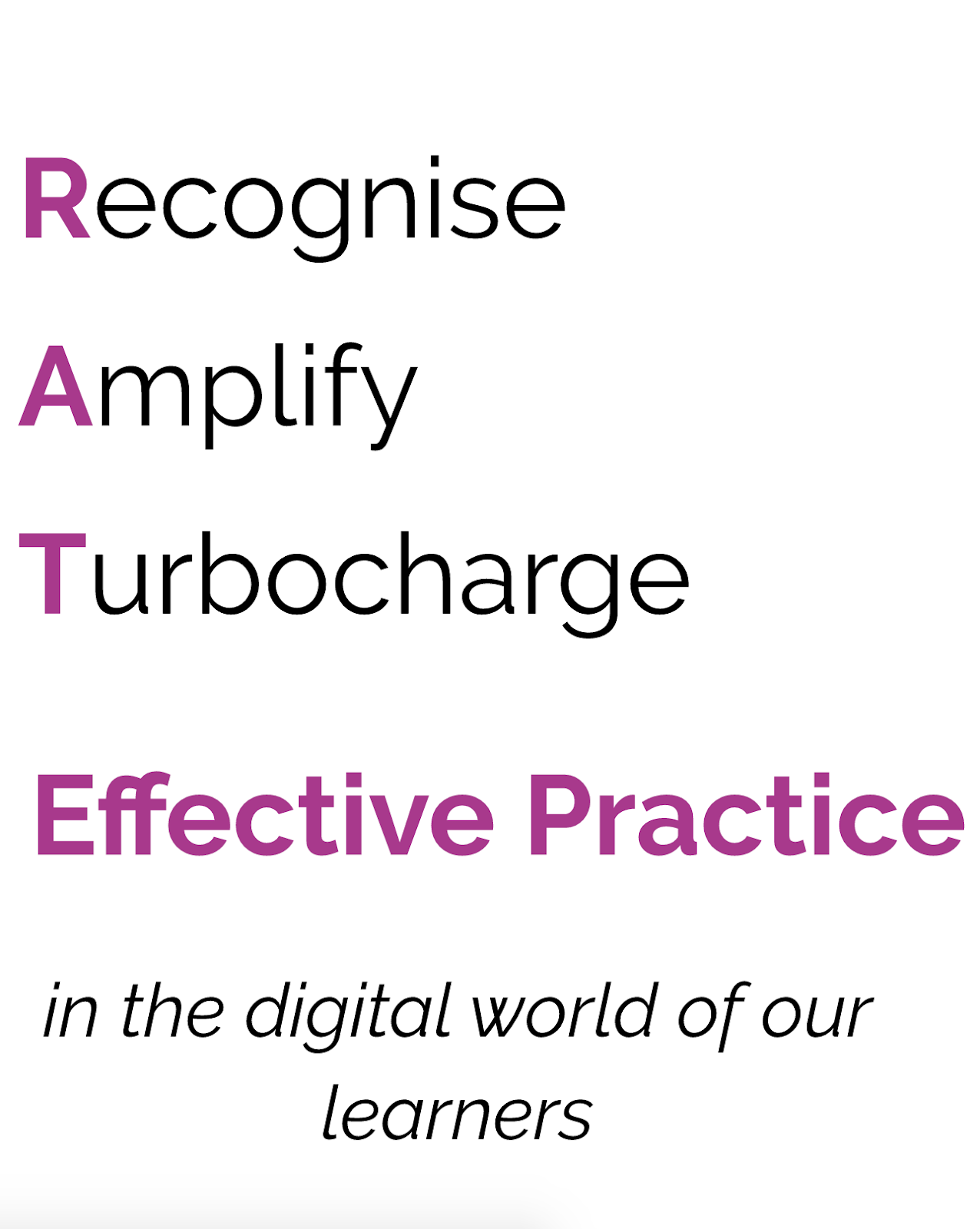
Dorothy presented to us about the 'Learn' aspect of Learn, Create, Share and the importance of effective practice.


I connected with the acronym of RATE and the importance of recognising effective teaching practice, amplifying and then turbocharging that effective practice through the process of sharing with other teaching practitioners and encouraging the spread of effective teaching and learning. I also valued the aspect that in a digital world, we are enabling our students to develop in to life long learners and that we need to value this technology as more than just a tool, as it opens up a world of possibilities for both us and our students.

Our final part of the day was the 'Create' session, where in small groups we recorded a google meet using Quicktime. This was a great opportunity to practice using hangouts as a way of connecting and sharing learning.


Thursday, July 25, 2019

DFI Session One - Core Session


Today has been a stimulating and engaging day. Just having the time to think about and process information, away from school has been valuable. I found Dorothy's introduction to Manaiakalani and the why 'Learn, Create, Share' was introduced valuable. Too often we hear that Manaiakalani is all about the Chromebooks, when in actual fact, the Chromebooks are just one of the many tools associated with Learn, Create, Share and the pedagogical knowledge that sits behind everything we do. Learn, Create, Share comes in many forms. One thing I think we do need to work on, is convincing parents that when students are working on Chromebooks to do daily writing activities, or using voice to text tools, they are still 'writing'. I am still frequently dealing with parents who feel that because their children are not writing by hand, they are not 'writing'. Explaining to parents that writing is about more than just the letters on a page and how tidy their child's handwriting is, it is actually about the child's ideas and how they share these.

I have found it really valuable to be reminded of some of the amazing add ons, extensions and shortcuts that are available for us with google and google docs. While I have used some of these add ons before, I had forgotten about them which is so easy to do as we get on with daily teaching. One of my takeaways from today is to ensure I get some of the add ons pushed out to my students and that we begin to use them on a regular basis, up skilling them as well.


One I am very keen to go away and try is the Talk and Comment Doc add on, that will allow me to use voice notes to give students feedback. I have used Kaizena in the past, but found it became very hard to manage, so I am keen to give something new a go. I am also keen to use Driveslides as a new way of sharing images on my class site and class blog.

I had never really thought about using google docs as a design tool, so having a play with different aspects was fun and made me think about how we could use this in the classroom as well, when students are presenting information or in order to make tasks for students more interesting. I had a go at creating a doc for a gratitude journal template as this is something we do everyday in my Homeroom class, but have a paper version and if students had a digital version, they could also do it at home (we currently keep paper ones in the classroom so that they are there every day). While this was just a play, I would need to keep in mind how I could make it appealing to all class members, and to give them options for personalisation.